Showing posts with label Apps. Show all posts

Appy Holidays!

On the tenth day of posting this Speech Lady gave to me, the apps that make her (h)appy!

SonicPics-$2.99


3. My Life Skills Box-Free however you buy additional sequences/stories for $0.99 each

Check them out!

These app recommendations are purely my opinion and I have not been provided with codes to review these nor have I received any other kind of compensation to review these apps. 

Language and Conversation Builder Review

On the 9th day of posting this Speech Lady gave to me, two apps that she uses all the time!!

The wonderful people over at Mobile Education have patiently waited as I've taken forever to put up this review.  Trust me, it's not because I haven't been using it.  These are some of my most frequented apps currently!

Language Builder has some pretty exciting awards such as:
Winner – 3rd best educational app of 2011 by AppsForHomeschooling.com
Winner – 9th best educational app of 2011 by SmartAppsForKids.com

This app is a wonderful addition to your arsenol as you increase MLU (mean length of utterance), increase your student's lexicon and work on syntax. 

Below is the home screen.
It allows you to track by each child's name, choose hint level (see below) and pick the picture theme most appropriate for your students.  Depending on the level of your child you can turn off the audio and you can also choose what hint level your student is at. 

Level 1 Hint: A sentence is given with two blanks.  The student can then fill in the blanks with appropriate words.

Level 2 Hint: Level 2 gives the student a carrier type phrase to help them start the sentence related to the picture. 

Level 3 Hint: Gives the student an auditory clue.  It gives them key words to use as they build the sentence. 

Within each of these levels you can record the sentence your student produces.  This recording can then be archived to send yourself or playback to your student as reinforcement or another teaching method. 
I've used this a lot with my older kids that I want to increase the amount and complexity of their utterances.  I would definitely recommend this one and you can get it here for $9.99


They were also generous enough to provide me with the code for Conversation Builder

Conversation Builder has also won an award.
Winner – 2nd best Educational App of 2011 by Smart Apps For Kids

Below is the homepage
Just like Language Builder it allows you to track progress by student's names.  You can also decide what type of conversational exchange your are targeting, 1:1-4 exchange, 1:1-8 exchange and group conversation.  You can also choose who the initiator of the conversation will be-student or peer.  Then below that you have the option of a number of different picture modules.  The pictures are clear and super engaging. 

Below are some examples:

Student initiated conversation

Peer initiated conversation

Group conversation

This app is great for your social skills group as well as your older students working on expanding MLU, syntax, lexicon etc.  I used this app with my Social Language class and while the conversations turned into 4 year old conversations, it definitely started conversations that were then easy to target initiating, conversational turns, on-topic comments etc. 
You can buy this app here for $19.99


*Disclaimer: Mobile Education provided me with a code to review these products.  No other compensation was provided.  The opinions expressed are that of Speech Lady Liz. 


Custom Boards and Wh- Questions-Review

On the 7th day of posting this Speech Lady gave to me, some apps that are freaking awesome!

Custom Boards

The nice people over at Smarty Ears sent me a code for Custom Boards to review.  Custom Boards is a bang for your buck kind of app.  There are a number of things you can do and make with this program. 

On the main page you can choose from a number of pre-made templates (over 100 templates).  The templates include game and activity boards, boards that go along with AAC devices, an option to make signs and labels, schedules and calendars, worksheets and custom grids and boards. 
Here are some examples of the game boards I've created. 
Pick your game board theme, then decide what pictures you want in each circle.  Custom Boards has a huge amount of pictures in their picture dictionary to choose from AND if you can't find the right image then there is a direct link to google to search for pictures. Once you have selected all your pictures you can email it to yourself as a PDF, print or save to your photo library.   Here are some examples:


If you are making pages for devices or switches, Custom Boards gives you the option to choose from 33 different AAC devices and switches.  I've made several Go Talk pages from this app. 

The signs and label option is great for making visuals for you classroom.  It has an option to make something as simple as labels for boxes to traffic symbols and speech bubbles. 
The Calendar option is great for your kids that need visual schedules.  You can make custom schedules so easily it would be silly not to!  Here is an example of a first/then schedule I made. 

The Worksheets option has a lot of great visuals to use with any activity.  There are worksheets for sequencing, making small books, before and after, sorting and other themed worksheets.
All in all I really love this app.  It takes all the hard work out of making homework sheets, class activities, schedules etc.  

You can buy Custom Boards here for $39.99.  I really think this one is worth the price!

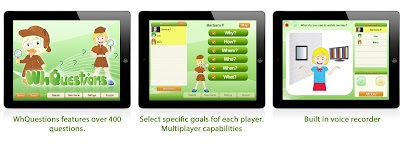
The next app is also from Smarty Ears and it's called Wh- Questions
This app allows you to have multiple students saved and you can hand pick based on that child's goals what type of questions are asked.  Most if not all of the students I've worked with that have a language disorder or delay have some kind of wh-question goal.  Wh-questions can be targeted in a number of ways, but this app has engaging pictures that help keep the attention of the child. 
 My suggestions for future versions of this app would be the ability to pick and choose what questions are asked as well as the difficulty.  It would be great if the questions had a multiple choice option where the children could use visuals to answer the question.  Because my students are so little, the visual representation of answers is key in their ability to be successful.  I do really like this app for progress monitoring.  Every couple weeks go through and see the gains the child has made towards their goals.  
All in all this app is interactive and engaging. 
You can buy it here for $9.99

Thanks Smarty Ears for your generosity to Speech Lady Liz.   


*Disclaimer: Smarty Ears provided me with a code to review product.  No other compensation was provided.  The opinions expressed are that of Speech Lady Liz. 

Appy Hour -Speech4Good

On the 5th day of posting this Speech Lady gave to me, an appy hour for disfluency!

The generous people over at Balbus Speech provided me with a code to try out their app Speech4Good.   When I first saw this app nightmares of Speech Science classes came flooding back.  Speech Science was the one class that never clicked with me.  So needless to say I was thinking how the heck am I going to use this app.  I was surprised at the number of possibilities I came across as I used and played around with this app. 

Speech4Good can be used for a number of different purposes. 
-Disfluency
-Inarticulation
-Easy Onset
-Vocal quality including pitch and intensity
-Prosody

The home screen looks like this:

The SpeechCenter takes you to the oscilloscope (a.k.a. speech graph) where you can record sessions, keep data and use Delayed Auditory Feedback (DAF).  DAF is a speech therapy technique used mostly with individuals who stutter, have Parkinson's or other voice disorders.  The DAF in Speech4Good takes voice input and outputs it at an adjustable time, generally milliseconds of time, so that you can naturally slow down your rate of speech to increase awareness of changes in your speech.  Below is a screen shot of the SpeechCenter. 
Below are some different speech graph views.

One of the children that I used this has difficulty with prosody.  He has a very monotone voice, so we work on inflections in general conversation as well as when asking questions.  This was a great tool to use to compare speech graph views.  I said a sentence and then he would try to match the sentence.  In the end we wanted our speech graph to look similar.  This was also helpful in increasing the intensity of his voice.  Those soft-spoken students have to match their speech graph to yours (my loud and obnoxious SLP voice).  I don't currently have any students who demonstrate disfluencies, but I played around a lot with this app and will be extremely excited to use it when I get a child working on fluency.   The visual representation is an integral part of therapy for any child or adult. 
The rest of the homescreen offers a library where you store past speech graphs and recordings. 

It also has an option for sharing.  You can share your speech graphs through email, Facebook, Twitter.  I'm not so sure I would use the Facebook or Twitter option, but email for sure.  Telepractice is becoming such a growing part of our field.  Imagine your patients could send you speech graphs so you can monitor and track their progress. 

The Lite app is offered for $4.99.  The difference in the Lite app is that you cannot record.  The regular app is $19.99 and you can buy it here


Have any of you used this app? If so what are your favorite features?

Screeners and Tests, Oh My!-Appy Hour Review

On the third day of posting this Speech Lady gave to me, some screeners and evaluations. 

The Common Core Early Language Screener is a screening tool used to identify weaknesses in early language skills.  The screener is made for children Pre-kindergarten-Kindergarten age.  This screener has some great features including:
"1. Ability to watch a video tutorial of how to effectively use the app;
2. School and evaluator information only has to be entered one time, then it is automatically added to each new screening and report;
3. Ability to enter a student’s name and track progress over time;
4. Ability to review past screenings;
5. Generate a report analyzing performance in each subtest;
6. Ability to print evaluator form and/or child form."

I have used this app to monitor progress with several of my kids.  I initially gave the screening, and then 9 weeks later gave it again to track progress.  The analyzing of data that this app provides is extremely helpful in determining what comes next for short term goals and what goals have been mastered.  Below are the language targets in the screening.
Here are some screen shots of test items.  I love all the colorful images as this helps with keeping kids attention!


This assessment is a series of pictures targeting English phonemes in initial, medial and final position.  This test is not a standardized measure, but it is made to be used in conjunction with standardized assessments (I would use it along side the Goldman Fristoe Test of Articulation-2). 


It starts with adding students.  You enter their name, birthday (which they automatically calculate the chronological age) and whether English is the only spoken language.  Then you can start the assessment.  Each picture is a clear, colorful and engaging picture.  The word is at the top and the targeted sounds are green.  When there is an error you click on the sound and you are given options of whether they deleted, distorted, assimilated, substituted etc.  as well as the most common phonological processes associated with that sound.  I love that you can also record your session while giving the assessment (the only suggestion I would make is that you can have more than one recording).  Once the assessment is complete it gives you a detailed description of all the errors including phonological patterns etc.  It gives you a raw score which you can then compare to your standardized assessment to decide if they are commensurate with each other.  What I like about this is the ability to progress monitor without pulling out files and going through millions of papers (or is that just my files?!) I really like the fact that it's on the iPad because let's face it kids are waaay more likely to entertain the idea of sitting through 20+ pictures if it's on the iPad and there are pretty pictures. 

All in all I'm very excited to have these two items in my arsenal! 

Appy Hour-ARTEL Larson

Phrase Stress


Students I use this with:
Children working on pragmatics that have difficulty understanding idioms.
Children with auditory processing needs. They can determine what word the stress is on.
Children who have difficulty with suprasegmentals

Details:
Phrase stress presents you with an idiom. You can choose to have the sound off or on when using this app.  Then you are given 3 choices to choose from to solve the idiom.
Specifically, I initially used it to take baseline data. Then I taught the skill targeted whether it be idioms or stress.  At the end of the data taking period I went through the app again and took post test data to see whether there had been improvement.
One aspect of the app that I really like is that you can use it as a teaching method as well as to take data.  If you click on the book icon it has every idiom targeted, what it actually means and how it could be used in a sentence. Again, I've mentioned before I like versatile products and this is one of them .

Word Balloons


Students I use this app with:
Kids working on carryover articulation skills
Kids working on syntax
Kids working on fluency

Details:
Word balloons is an app that has the 500 most commonly used words in the English language. On the screen there is a word presented at the bottom.  You have to find the balloon that matches that word as the balloons float across the screen. For children working on carryover of articulation, I have them repeat the word. For children working on syntax I have them tell me whether the word was a noun, verb or adjective.  For a child working on fluency I have them say the word using a specific type of disfluency or have them say the word in a sentences using smooth speech. 

Word Stress


Students I use this app with:
Kids with auditory processing disorder
Kids with attention and memory issues
Kids working on articulation and phonology
Kids working on producing multi-syllabic words

Details:
Word Stress has a dictionary of 5,000 most commonly used words in the English language.  You can choose to have a maximum of 4, 5, 6, 8, 10 or 10+ letters in the words.  I used this app with a child working on auditory memory tasks and so I chose 4 letters and he had to listen to the word while looking at the screen and then fill in the blank.  If you wanted to work on multi-syllabic words, I'd choose 10+ letters in the words and then we would practice clapping out the word and work together to fill in the blanks.  This app is difficult to use with younger children because it helps to be able to read and have phonemic awareness to complete the tasks. 


All in all these were fun apps that engaged the kids and helped them attend to the activities. 
Have you used these apps? Did you use them differently than my suggestions? I'd love to hear how! Please leave a comment so everyone can benefit from your genius :)


**Disclaimer: The opinions expressed in this post are Speech Lady Liz's.  The companies are nice enough to provide materials to try out, but provide no other compensation.


Halloween Prep & Appy Hour

My Halloween outfit is coming together (I'll be a ballerina) and I'm reminiscing about my Halloween post last year.  I haven't decided yet how I'll incorporate Halloween into my new class.  Pretty sure it will involve some pretty hands on activities.  I'll keep you updated on that through Facebook or Instagram.

Make sure to check out what I used last year in my classroom.


Here are some fun and free apps to use for the holiday.
Take a picture of you or your student and they can choose to put Halloween items on certain parts of their body or face (i.e. Put the pumpkin on your head). 

I modeled what I wanted the kids to do by saying, "Put the triangle eyes on the pumpkin." Then they got a turn to give me the directions. 
There are so many awesome Halloween activities out there.  Make sure to check back on Thursday for "End of the Week SLP Blues". 

Appy Hour-Following Directions

The Super Duper folks have been extremely generous with me and their app codes. I knew I wanted to have an auditory processing week and I realized the saying is true "ask and you shall receive ".   I asked for a following directions app and here it is.


So I have to admit I'm not much of a drill and kill type of SLP...assuming you all could tell that about me. So as much as I seriously love the auditory processing program that I reviewed yesterday I need some variety and I know the kids do too.  I generally like to have centers during 1:1 therapy.  It's that ADD I suffer from. I know the kids I work with can't sit and look at pictures for 45 minutes straight so I like to have activities that we move to and from. Even in a small therapy room I use colored circles to mark the activities. So first we do the red circle, then the yellow and then the green (I use this stop light as a visual for centers too). If they make it to the green then they get free play time.
Anyways, enough with that, let me tell you how I incorporate this app and The Processing Program.  The red center is generally the one that is the hardest for kids to sit through (but generally the center where I get the most data) and that's the drill or picture center. I use the auditory processing program and we do that for 10 minutes. Then the yellow center is iPad based because as soon as I pull the iPad out they are beaming with excitement. So now I can get to the nitty gritty of how I use this app. I add the child's name to the list and then depending on what their goals are, I do as follows:
-Choose what directions I think are appropriate ( love that about the super duper apps), then we go through them one by one and they follow a direction or they give me a direction.  They have to listen to what the app has said and repeat the directions back to me (I'm tricky like that. I like to make them work when they don't even know they are working).
- If the child's goal is to follow multi-step directions, then I choose 2-3 and I verbally give them the directions. Once they think they have completed the task they get to go back and scroll through to see if they got it right.  This is very motivating!  Just the visuals keep them loving this yellow center. 

After the yellow center comes the red center. This center could be a number of things. I like to make it less following directions based. I like to have them listen and decide if something rhymes, or what word had stress on it, or listening for the change in sounds in words. It's up to you. If you need help with these activities come back tomorrow or Friday for free ideas and downloads to use.


Happy "Appy Hour"!

Appy Hour-Super Duper Social Edition


This app, like all Super Duper apps, allows you to pick and choose the cards that you want presented to your students.  There are 7 sub-categories in this pragmatics app.  They include Politeness, Solving Problems, Feelings, Giving Info, Requesting, Telephone Skills and Staying On Topic.  I used this directly with the Simply Social at School-7 that I reviewed yesterday.  Each of these sub-categories coincides perfectly with one of the 50 lessons in the book.  The app is great to use for generalization, group activities and/or as a reward.  I used the app to get a baseline.  I chose the category I was going to teach that week, the kids went through the cards and answered accordingly, I used the buttons on the app to keep track of whether or not they gave the right answer, and there you go baseline data.  I then spent the week teaching them the lessons and then at the end of the week we went through the same cards and again used the buttons on the app to decide which ones they got right and wrong and hello progress monitoring! What's great is that you can enter each of your students by name and then at the end email yourself or parents the data you obtained from the app.  This app is also great if you need to get conversation going to get a language sample, carry-over articulation skills into conversation or work on fluency. 


I used this in a similar way as I did the Practicing Pragmatics Fun Deck.  I hand picked the cards that went along with the lesson that week took a baseline and then monitored progress at the end of the week.  What I like about this app is that all the What ifs....really do happen to these kids on a daily basis.  A lot of my students can decide what someone else should do in the situation, but when they themselves go through it they are unable to use those social thinking skills.  I like to do the ol' "Well Johnny I agree that's what the girl should do.  Has this situation ever happened to you?".  Most of the time I get a big "NO", but then when I remind them that in fact yesterday they did get in trouble in class for talking while the teacher was talking, they "sort of" remember then.   This is another excellent app for getting conversation going and even better getting group conversation going.  We talk about how everyone handles situations differently, but we have to remember our social thinking skills and make sure that we make the right decision.  This app would really work well with your older elementary students that may be transitioning to middle school.  You could even create your own "What ifs..." that apply personally to each student and they could draw the picture and take it home so parents can be aware of issues that may be happening at school.  

So, that is how I used these apps and integrated them into lessons using Social Skills at School-7.  

I hate to tell you all this, but for this "Appy Hour" I'm sitting on the beach in North Carolina.  Go ahead and be jealous!

Happy "Appy Hour"!


Disclaimer: The opinions expressed in this post are Speech Lady Liz's.  The companies are nice enough to provide materials to try out, but provide no other compensation. 

Appy Hour- Speech With Milo Adjectives Review

Speech With Milo-Adjectives
Speech With Milo-Adjectives is a vocabulary building game that would be great to use with your pre-school kids and/or younger elementary students that have a language impairment. 

How it works:
First you choose the words that you want your student(s) to target.  The adjectives you can choose from range from easy (happy, sad) to more difficulty words like (wide, narrow).  Once you've chosen your words you touch "Go" and you are presented with great animated scenes that describe each word.  When using it with your younger kids you can leave the sound and written word on to teach each concept.  As they learn the new vocabulary you can choose to take the word or sound off and they have to determine what vocabulary word Milo is presenting.  You also have the option to put the word in a phrase. 

Alternative Uses:
There are a lot of antonyms in the vocabulary that you can use.  So now this adjective game is an antonym game.  Depending on the child's level I like to have them put the word in the sentence or act out the word themself. With one of my Kindergarten groups we had a "Milo" day and each student had an opportunity to be assigned an adjective from the app or one that I thought of.  Then we played charades and acted the words out and their classmates had to guess what word they were acting out. 
*Warning: The kids became super silly with this game so make sure to have some "calm down" time before you send them back to class. Their teachers will thank you! :)


Happy "Appy Hour"!


Disclaimer: The opinions expressed in this post are Speech Lady Liz's.  The companies are nice enough to provide materials to try out, but provide no other compensation.


Appy Hour- Language Adventures

Smarty Ears was generous enough to give me a code to review their Language Adventures app.  Let me give you a bit of a run-down on the app and how I used it.


On the home page you begin be adding students as players.  When you add students you can put in their birthday, grade, and what their target is.  In this app you have the option of synonyms, antonyms and multiple meanings.  Another added feature is you get to decide if you want the child to work on these goals receptively or expressively.  If you want to start with receptive and then later on work on expressive you just double tap the player and change it up.  Once you've selected your players you choose a level.  There are 3 different levels.  Each level has a different themed board game and themed questions (playground, cafeteria classroom). When you've entered a level the child can tap on the dice move their game piece that many spaces and then they are asked a question.  An example of a question would be, "Your friend gets in trouble for telling a joke.  What is another word for silly?" The types of questions are great for stemming conversation off of.  So for this particular question, they can answer the synonym question, but you can also discuss problem solving strategies. 

Additional Features:
-In the settings section it has different options for when the student does not answer the question correctly.  You can "Keep Going", "Remove Item", or "Buzz".
-You can keep track of your student's progress and even email yourself (or parent) the results of how they did. 

All in all this was great app for working on building vocabulary through synonyms, antonyms and multiple meaning questions.  My students had a lot of fun with it and the words were difficult enough, but not too difficult.  This would be a great game to work on with students in grades Kindergarten and above.

Happy "Appy Hour"! 


 *Disclaimer: The opinions expressed in this post are Speech Lady Liz's.  The companies are nice enough to provide materials to try out, but provide no other compensation. 

Appy Hour


Bluster!-Free
In the app Bluster you can pick what grade level and then you decide whether you want to work on rhyming words, prefixes, synonyms, homophones, word roots etc.  I used this app to practice synonyms.  They give you quite the list of words and you have to find the 3 words that all mean the same thing.  It's a kind of difficult game, so I used it with some of my upper elementary kids, but it definitely had them talking and working as a group to come up with the 3 synonyms. 


_________________________________________________


Feel Electric!-Free
The first thing as you're introduced to the app is to decide how you feel.  The app gives you a bunch of words and you decide how you're feeling.  If the child doesn't know what the word means, you just tap it and it gives you a definition.

There are several different features to this app. 

Mood Tales-
Mood Tales has you pick words and then it incorporates the word into the story.  This is great for talking about vocabulary.  Keep track of all the words you choose and then have the group try to come up with a silly story (kind of like mad libs).  Then see what kind of story the app came up with.  This was really fun and great for working on intonation and using and understanding different voices when you are happy/angry/excited etc. 

Mood Dude-
Mood Dude talks about how you can look at someone's face and all the little things tell you how they are feeling.  You can make the Mood Dude's eyes go down, change his eyebrows, mouth and arms. 

Moodosphere-
Moodosphere keeps track of your feelings and you can see how your mood has changed over the week. 

There are games that you can play also. One of them is where a picture of a person goes across the screen and you have to pick the emotion that they are feeling. 

All in all I was very impressed with this app.  Especially because it's FREE!

_________________________________________________


Speech With Milo Therapy Ideas-Free
This is kind of like a Twitter account.  They post "#milotips" for you to use in therapy.  They also give you links to other blogs that have fun activities.  Great if you can't wait for my "End of the Week SLP Blues" and you need an idea ASAP.  I've seen some really cute and easy ideas posted on this feed. 


Happy "Appy Hour"!

Appy Hour-Super Duper Edition

In this Fun Deck there are pictures of people doing things that don't make sense, like pouring cereal into a pot or washing dishes in milk.  I used this app in a couple different ways.  I have several kids that have some major auditory processing issues, so I turned the sound up high and hid the picture from them.  They listened to the sentence and then had to decide which part of what they heard was absurd (by the way absurd became the favorite word of the session after they figured out it meant "weird".).  Then I showed them the picture and they got to hit the green button if they were right and the red one if they were wrong. I also used it with some of my kids that are working on grammar.  I turned the sound off this time and they had to look at the picture and decide how to describe it to me.  Then we turned the sound on and they listened to what the app said.  If they were right or at least close enough that it made sense, they got to press the green button.  This is also a great app to use with your kids that are on the spectrum.  There is a picture of a girl walking a fish bowl and one of my students said that the absurd part of the picture was that the girl was wearing really tall shoes. Ya....after I hit my head on the table a couple times we had to go over each part of the picture and then he finally got it.   


In this app there are pictures of people doing different things and blank conversation bubbles over them.  The idea is to figure out what the person/people might be saying to each other.  This app is good for kids that are working on expanding utterances, grammar etc.  I also used it with a fluency group and had the kids exhibit different types of stutters and/or use their strategies while describing what the person would be saying.  This is a really great app if you have any kids that have an answering "why" questions goal.  I asked my students to determine what the character was going to say, and then I asked them, "Why?".  This was a lot more difficult, so I was able to teach some of those more critical thinking skills.  A feature of this app (and other Super Duper apps) that I really like is that you can decide which pictures to use and weed out the others.  I had a group of kids that are working on pragmatics, so I only picked the cards that had multiple people in them.  Then I came up with what the two characters were saying.  The group had to decide if they would have "good" thoughts or "weird" thoughts if someone said that to them.  If it was "weird" thoughts then they had to fix what the character said. 


60 Story Starters
This app has pictures and then gives you a story starter.  My students working on language had a lot of trouble with this app.  They weren't quite sure where to go with the story starter.  Well what a perfect opportunity to work on story telling?!  I had to start them out with an example and then we talked about transition words.  Some of the story starters I wasn't a huge fan of, just because they were difficult to expand on.  That being said, it was really easy to come up with your own.  I also turned the sound off and the kids came up with their own story starters.  I not only used this with my students working on language, but I used it for carryover practice with my kids working on articulation.  How many times have you attempted to get conversation going so you could get a language sample? This is your app. 


Not sure if you saw my previous post, but Super Duper is permaneantly selling their apps for $1.99.  I think it's pretty awesome that Super Duper actually listened to their customers and lowered the costs so they would be more affordable.  I for one am very thankful!


*Disclaimer: The opinions expressed in this post are Speech Lady Liz's.  The companies are nice enough to provide materials to try out, but provide no other compensation. 

Appy Hour Friday


Just wanted to give you all a head's up that Super Duper has permanently changed their app price from $5.99 to $1.99.  That's a 67% discount PERMANENTLY! How great is that?!?!

Check back next Wednesday for my weekly "Appy Hour"-Super Duper edition.

Appy Friday!