"Moore" Ways to Support SLPs

I just bought and downloaded bundle #1 and #2 of tons of therapy activities donated to help benefit the SLPs effected by the tornadoes in Moore, Oklahoma.


This SLP blogging community is pretty sensational.  While I've been rather absent I continue to be amazed at what so many SLPs are creating with their limited time.  Now they've put together amazing bundles of downloadables for the benefit of colleagues effected by such a tragic loss. 

Make sure to click the link below to grab your bundles and help support these SLPs who have lost everything.  All the proceeds go directly to the Moore SLPs.  
 

January-Homework

On the twelfth day of posting this Speech Lady gave to me, a reminder to download homework!


Don't forget to download homework for the month of January!

End of the Week SLP Blues-Winter Edition

On the eleventh day of posting this Speech Lady gave to me, some ideas for the last week of therapy. 


Back in the day when this Speech Lady had time to make all kinds of therapy activities I had not one, not two, but three winter posts here , here and here.  Don't worry I'm laughing at myself thinking about a.) how busy I was at work and b.) my days in Austin and the snow.  Chicago has no pity on me now. 

Appy Holidays!

On the tenth day of posting this Speech Lady gave to me, the apps that make her (h)appy!

SonicPics-$2.99


3. My Life Skills Box-Free however you buy additional sequences/stories for $0.99 each

Check them out!

These app recommendations are purely my opinion and I have not been provided with codes to review these nor have I received any other kind of compensation to review these apps. 

Language and Conversation Builder Review

On the 9th day of posting this Speech Lady gave to me, two apps that she uses all the time!!

The wonderful people over at Mobile Education have patiently waited as I've taken forever to put up this review.  Trust me, it's not because I haven't been using it.  These are some of my most frequented apps currently!

Language Builder has some pretty exciting awards such as:
Winner – 3rd best educational app of 2011 by AppsForHomeschooling.com
Winner – 9th best educational app of 2011 by SmartAppsForKids.com

This app is a wonderful addition to your arsenol as you increase MLU (mean length of utterance), increase your student's lexicon and work on syntax. 

Below is the home screen.
It allows you to track by each child's name, choose hint level (see below) and pick the picture theme most appropriate for your students.  Depending on the level of your child you can turn off the audio and you can also choose what hint level your student is at. 

Level 1 Hint: A sentence is given with two blanks.  The student can then fill in the blanks with appropriate words.

Level 2 Hint: Level 2 gives the student a carrier type phrase to help them start the sentence related to the picture. 

Level 3 Hint: Gives the student an auditory clue.  It gives them key words to use as they build the sentence. 

Within each of these levels you can record the sentence your student produces.  This recording can then be archived to send yourself or playback to your student as reinforcement or another teaching method. 
I've used this a lot with my older kids that I want to increase the amount and complexity of their utterances.  I would definitely recommend this one and you can get it here for $9.99


They were also generous enough to provide me with the code for Conversation Builder

Conversation Builder has also won an award.
Winner – 2nd best Educational App of 2011 by Smart Apps For Kids

Below is the homepage
Just like Language Builder it allows you to track progress by student's names.  You can also decide what type of conversational exchange your are targeting, 1:1-4 exchange, 1:1-8 exchange and group conversation.  You can also choose who the initiator of the conversation will be-student or peer.  Then below that you have the option of a number of different picture modules.  The pictures are clear and super engaging. 

Below are some examples:

Student initiated conversation

Peer initiated conversation

Group conversation

This app is great for your social skills group as well as your older students working on expanding MLU, syntax, lexicon etc.  I used this app with my Social Language class and while the conversations turned into 4 year old conversations, it definitely started conversations that were then easy to target initiating, conversational turns, on-topic comments etc. 
You can buy this app here for $19.99


*Disclaimer: Mobile Education provided me with a code to review these products.  No other compensation was provided.  The opinions expressed are that of Speech Lady Liz. 


Superflex and Sidekicks

On the 8th day of posting this Speech Lady gave to me, some friends for Superflex. 

I've posted ideas from my friend Angela before (because she's pretty genius), and I couldn't help but want to post this as soon as I saw it.  I mean Superflex has all these enemies, but he needs some sidekicks too, right?!?

Meet Perspective Pete-


& Positive Polly

Check out Angela's website with tons of other ideas too!

p.s. Ang I get to see you in 7 weeks...let the countdown begin!

Custom Boards and Wh- Questions-Review

On the 7th day of posting this Speech Lady gave to me, some apps that are freaking awesome!

Custom Boards

The nice people over at Smarty Ears sent me a code for Custom Boards to review.  Custom Boards is a bang for your buck kind of app.  There are a number of things you can do and make with this program. 

On the main page you can choose from a number of pre-made templates (over 100 templates).  The templates include game and activity boards, boards that go along with AAC devices, an option to make signs and labels, schedules and calendars, worksheets and custom grids and boards. 
Here are some examples of the game boards I've created. 
Pick your game board theme, then decide what pictures you want in each circle.  Custom Boards has a huge amount of pictures in their picture dictionary to choose from AND if you can't find the right image then there is a direct link to google to search for pictures. Once you have selected all your pictures you can email it to yourself as a PDF, print or save to your photo library.   Here are some examples:


If you are making pages for devices or switches, Custom Boards gives you the option to choose from 33 different AAC devices and switches.  I've made several Go Talk pages from this app. 

The signs and label option is great for making visuals for you classroom.  It has an option to make something as simple as labels for boxes to traffic symbols and speech bubbles. 
The Calendar option is great for your kids that need visual schedules.  You can make custom schedules so easily it would be silly not to!  Here is an example of a first/then schedule I made. 

The Worksheets option has a lot of great visuals to use with any activity.  There are worksheets for sequencing, making small books, before and after, sorting and other themed worksheets.
All in all I really love this app.  It takes all the hard work out of making homework sheets, class activities, schedules etc.  

You can buy Custom Boards here for $39.99.  I really think this one is worth the price!

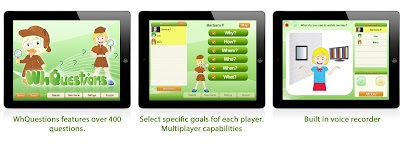
The next app is also from Smarty Ears and it's called Wh- Questions
This app allows you to have multiple students saved and you can hand pick based on that child's goals what type of questions are asked.  Most if not all of the students I've worked with that have a language disorder or delay have some kind of wh-question goal.  Wh-questions can be targeted in a number of ways, but this app has engaging pictures that help keep the attention of the child. 
 My suggestions for future versions of this app would be the ability to pick and choose what questions are asked as well as the difficulty.  It would be great if the questions had a multiple choice option where the children could use visuals to answer the question.  Because my students are so little, the visual representation of answers is key in their ability to be successful.  I do really like this app for progress monitoring.  Every couple weeks go through and see the gains the child has made towards their goals.  
All in all this app is interactive and engaging. 
You can buy it here for $9.99

Thanks Smarty Ears for your generosity to Speech Lady Liz.   


*Disclaimer: Smarty Ears provided me with a code to review product.  No other compensation was provided.  The opinions expressed are that of Speech Lady Liz.